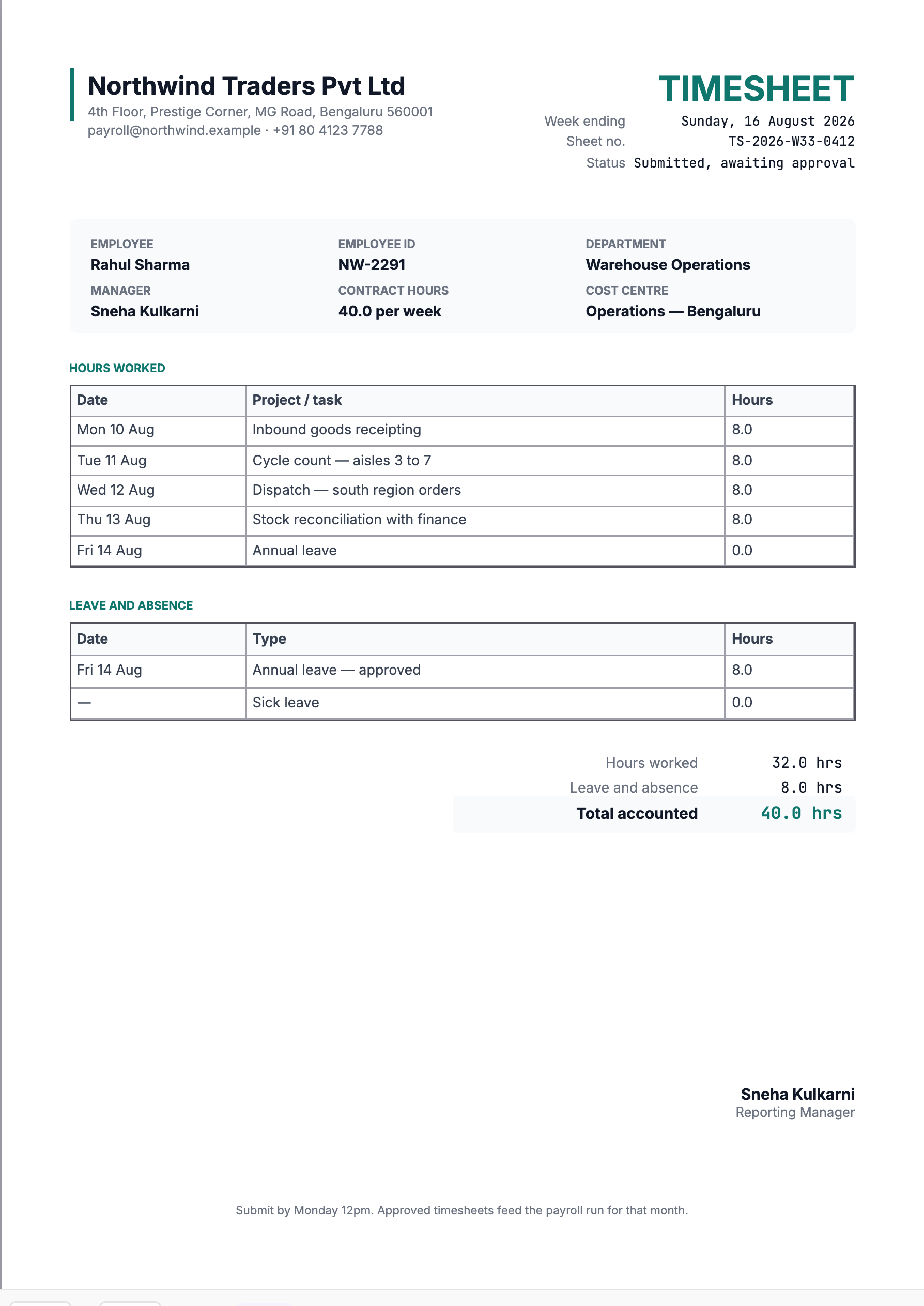
A timesheet is a payroll input that looks like admin. The week it is filled in carelessly is the week someone is paid wrongly, a project is charged for hours nobody can account for, or a leave balance quietly fails to move.
What belongs on a timesheet
| Field | Why |
|---|---|
| Employee name and ID | Payroll matches on the ID — names repeat, IDs do not. |
| Department and cost centre | Where the hours are charged. |
| Week ending and sheet number | So one specific week can be cited. |
| Contract hours | The figure the totals are checked against. |
| Date, task, hours | The record itself, one line per day. |
| Leave and absence | Listed separately from worked hours. |
| Status and approver | Approval is what turns this into payroll input. |
Worked hours and absence belong in different tables
The separation is the most useful thing on the page. In the sample week: 32.0 hours worked, 8.0 hours of annual leave, 40.0 accounted for against a 40-hour contract.
Now the shortcut. If Friday's leave is entered as eight hours worked, the total still reads 40 and payroll still pays correctly — but the leave ledger never decrements. Repeat that a dozen times in a year and the employee finishes with a fortnight of leave they have already taken, discovered only when someone computes an encashment on exit.
Absence type matters for the same reason. Annual, sick, casual, unpaid and compensatory-off draw on different balances and some affect pay directly. "Leave" as a bare word makes the row useless to whoever reconciles it.
Total accounted is the number to check
Thirty-two worked hours in a forty-hour week is not a problem in itself. It is a problem only if the missing eight are unexplained — which is why contract hours sit in the header, giving the reviewer something to reconcile against.
The check is one subtraction: worked plus absence should equal contract hours. Where it does not, either an absence line is missing, or a day genuinely was not worked and needs a category, or there is overtime that should be paid rather than absorbed.
A manager who approves on the worked-hours figure alone waves through every sheet with a missing leave line — those are exactly the sheets where the worked total looks healthiest.
The task column is where timesheets lose their value
"Cycle count — aisles 3 to 7" and "Warehouse work" take the same effort to type. Only one answers a question later: which cost centre absorbs the hours, whether the time was billable, whether the week went where it was meant to. If hours are recharged to a client, that column is the evidence, and "various" is not evidence of anything.
Write the line the day you do the work. Reconstructing a week on Monday morning produces plausible fiction with a signature — perfectly round hours spread evenly across tasks nobody can verify. A fixed-shift operations role genuinely does have identical eight-hour days; a project role almost never does.
Numbering, status, and corrections after approval
The sheet number here — TS-2026-W33-0412 — carries the year, the week and a sequence, so a sheet can be found from a payroll query without knowing whose it is. Keep the scheme mechanical.
Fix the week-ending convention once and hold it. This template ends on Sunday. If half a team submits Friday-ending sheets and half Sunday-ending, every aggregate is wrong by a couple of days and nobody notices until a month end fails to tie out.
Status is not decoration either: "submitted, awaiting approval" is a different state from approved, and only approved sheets should reach payroll. And when something turns out to be wrong afterwards, do not edit the approved sheet — issue a corrected one with the same week ending and a new number, and keep both. Overwriting an approved timesheet destroys the trail that made the approval worth having.